Photo: Core Visuals NYC
An app and a physical product get pitched with the same words (launch, reveal, drop) and then need almost opposite content. One has nothing to photograph and everything to demonstrate. The other has plenty to photograph and nothing that moves on its own.
App launches need screen capture, human context, and a clear demonstration of what the software does, because the product itself is invisible in a room. Physical product launches need texture, scale, and hands, because the object photographs well but explains nothing about itself. Planning both from one generic launch checklist is where most launch content goes thin.
Table of Contents
One Has Nothing to Photograph, the Other Has Nothing to Explain
The practical divide is simple: software lives on a screen, so a camera pointed at the real world captures only people looking at rectangles. An object lives in space, so a camera captures it beautifully and still leaves the viewer unsure what it does or how big it is.
That difference drives every downstream decision. An app launch spends most of its production budget on clean screen capture and on the human framing that makes the screen mean something. A product launch spends it on lighting, surfaces, angles, and scale references. These are the things that make an object read as real rather than as a render.
A launch is the public moment a product becomes available, and launch content is the set of assets that carries that moment across a website, a press kit, and social. Same definition, two very different production days, and the mismatch usually shows up as an app launch full of stock-looking office photos or a product launch that never shows anyone using the thing.
What an App Launch Actually Needs
An app launch needs three layers: high-quality screen recordings of the real product, a short demonstration that shows one job the software does end to end, and human context that makes the software feel used rather than displayed. Missing the third layer is the most common failure, and it is why so many app videos feel like documentation.
The screen work should be planned like a shoot, not grabbed the night before. That means deciding which flows to record, seeding realistic-looking data instead of placeholder text, choosing device frames, and capturing at a resolution that survives being cropped for vertical. This is the part most teams underestimate, and it is the part that separates a launch video from a support tutorial.
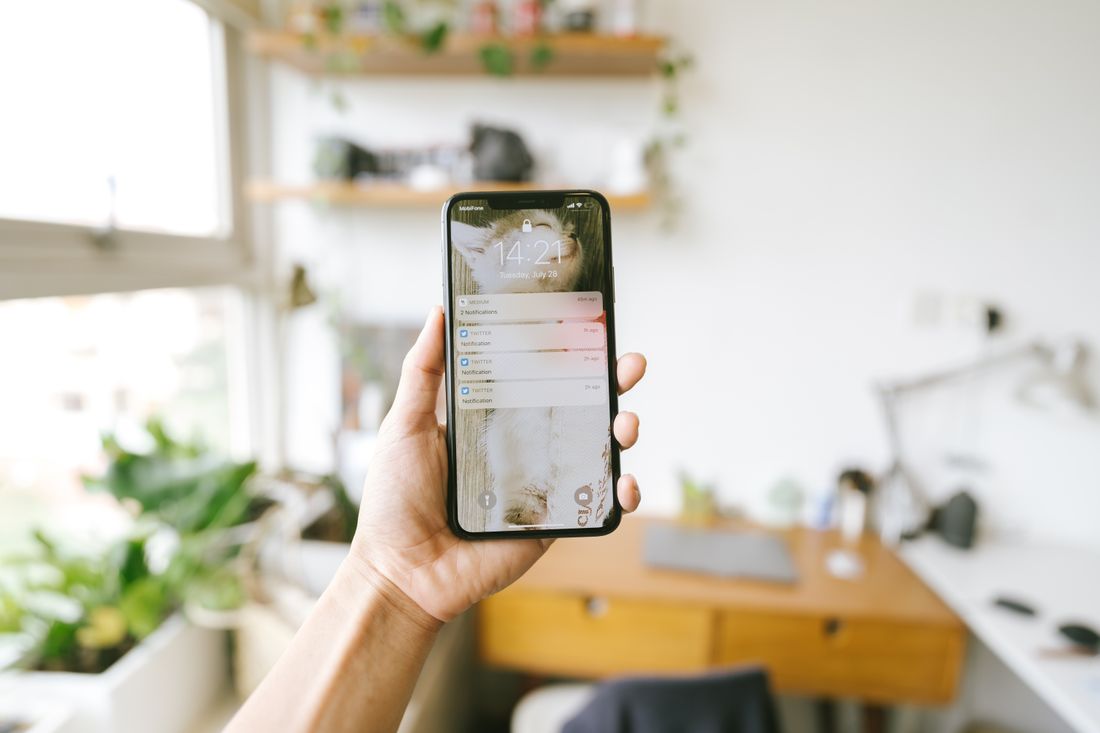
Human context does not mean actors pretending to be delighted. It means a real hand on a real phone in a real room, a founder explaining the problem the app solves in their own words, a workspace where the software plausibly gets used. Those frames are what carry the app onto a website hero and into a LinkedIn post, because a pure screen recording has nowhere to go once the demo is over.
One underrated asset is the still frame pulled deliberately rather than grabbed from video. App launches need static images for a press kit, a partner page, and an app store listing, and a frame composed as a photograph will always beat an export from a moving shot. Planning two or three of those on the day costs almost nothing and prevents a scramble when someone asks for a JPEG.
What a Physical Product Launch Actually Needs
A physical launch needs surface, scale, and use. Surface means lighting that shows what the material actually is. Brushed metal, matte plastic, coated fabric all behave differently under the same light, and getting that wrong makes an expensive object look cheap in photos.
Scale is the one people forget. An object photographed alone against a clean background could be four inches or four feet, and viewers who cannot tell will not guess in your favor. A hand, a table edge, a familiar object in frame, or a person holding it resolves that instantly, which is why the scale frame belongs on the shot list rather than in the maybe pile.
Use is where the object finally explains itself. A still of the product on a plinth proves it exists; a short clip of it being opened, worn, assembled, or switched on proves what it is for. For most product launches, that motion coverage matters more than another five angles of the same hero shot, because it is the only asset that answers the viewer's actual question.
Packaging deserves its own short list too. For a lot of physical products the box is the first thing a customer sees, and the unboxing sequence is the single most reused piece of launch content across social. Shooting it properly (closed, opening, contents laid out) takes about twenty minutes and covers a surprising number of downstream requests.

Photo by Valentin Ivantsov via Pexels.
What the Launch Event Itself Should Produce
Launch events serve the two product types differently. For a physical product, the event is a genuine content opportunity: the object exists, people are handling it, and reactions are real. Coverage should prioritize the product in people's hands, the reveal moment, and any demonstration station, because those frames cannot be recreated later in a studio.
For an app, the event produces almost no product content. Nobody photographs well while looking at a laptop, and screen shots taken over someone's shoulder in event lighting are unusable. What an app launch event does produce is credibility content (the founder presenting, an audience listening, a room that proves this was a real moment), and that is a different asset class from the demo.
Planning for that in advance prevents the standard disappointment where a team books full event coverage for a software launch and receives four hundred photos of people at a bar. The room shots are worth having. They are just not the launch content, and expecting them to be is how a launch ends up with a website that still has no usable product imagery.
Sequencing: Which Shoot Happens First
Product launches usually want the studio or location day before the event, because the hero imagery has to exist for the press kit, the site, and the announcement post, all of which go live at or before the event. Shooting the object after the launch means the announcement runs on renders or phone photos.
App launches often invert that. Screen capture can happen close to launch because the build keeps changing, and locking the demo footage too early means recording a version of the interface that ships differently. The human-context and founder footage can be shot earlier since it does not depend on the final build, which lets an edit come together quickly once the last screen recording lands.
In both cases the useful planning question is which asset has the earliest hard deadline, not which one is most fun to make. That is usually the press or partner package, and working backward from it tends to reorder a launch schedule in a way that feels aggressive but prevents the familiar week-of scramble.
The Press Kit Looks Different for Each
A press kit for a physical product is mostly imagery: clean hero shots on white or neutral, a few in-context frames, a detail or two, and a scale reference. Journalists and retailers can work from that set without asking questions, and the request that follows is usually for a higher-resolution version rather than a different shot.
A software press kit is mostly screens plus one human image. The screens need to be current, correctly framed in a device, and legible when scaled down into an article layout. The human image (a founder portrait or a shot of the product in use) is what a publication actually runs at the top of a piece, because a screenshot rarely works as a lead image.
Both benefit from being assembled before anyone asks. The requests arrive in a narrow window around launch, and the difference between answering in an hour and answering in three days is often the difference between coverage and no coverage.
When It's Both: Hardware With an App
Connected products need both plans, run in parallel, and the coordination point is the moment where the object and the interface appear in the same frame. That single shot (a hand on the device with the app visible) usually does more work than either half alone, and it is the one that requires both a working build and a finished unit at the same time.
The scheduling risk in hybrid launches is that the two halves are typically owned by different people. Hardware timelines slip in weeks, software timelines slip in days, and the shoot date usually gets set by whoever booked it first. Naming which specific combined frames are required, early, is what stops the launch from arriving with beautiful object photography and a demo of an outdated interface.
The good news is that hybrid launches usually get more usable content per shoot day than either type alone, because the object gives the app somewhere to live and the app gives the object something to do. It is worth planning as one production rather than two, even when the internal owners are separate.
Frequently Asked Questions
Do you need a video for an app launch, or are screenshots enough?
Screenshots prove the interface exists but cannot show a flow, and most app launches need to show one job completed end to end. A short demo video does that in seconds where a screenshot grid cannot. Screenshots still matter for app store listings and press use, so the practical answer is usually both, with the video carrying the launch announcement and the stills supporting it.
What is the most commonly missed shot at a physical product launch?
A scale reference. An object photographed alone on a clean background gives no sense of size, and viewers do not guess generously. A hand, a table edge, or a person holding the product resolves it immediately. The second most missed is motion, a short clip of the product being opened, worn, or switched on, which answers what it does in a way no still angle can.
Should you film the launch event itself for a software product?
Film it for credibility content, not for product content. Event coverage of a software launch produces a founder presenting, an audience, and proof the moment happened, all of which are useful. It does not produce usable product footage, because screens shot over shoulders in event lighting are not usable. Plan the demo capture as a separate, controlled session.
How early should product launch photography happen?
Before the announcement, which usually means before the launch event. The press kit, website, and announcement posts all need hero imagery at or before the moment of launch, so shooting the object afterward leaves the announcement running on renders or phone photos. Working backward from the earliest hard deadline, usually a press or partner package, tends to set the real date.
How is content for a connected device different from either one alone?
It needs both production plans plus a specific set of combined frames where the object and the interface appear together. Those frames require a finished unit and a working build at the same time, which is the scheduling risk since hardware and software timelines slip differently. Naming the required combined shots early is what keeps a hybrid launch from shipping with outdated interface footage.
Related Reading
Launching something this quarter?
Tell us whether it lives on a screen or on a shelf and we'll scope the shoot days around the deadline that actually binds.
See Personal Branding & Launches